iPhone & iPadאייפון ואייפד
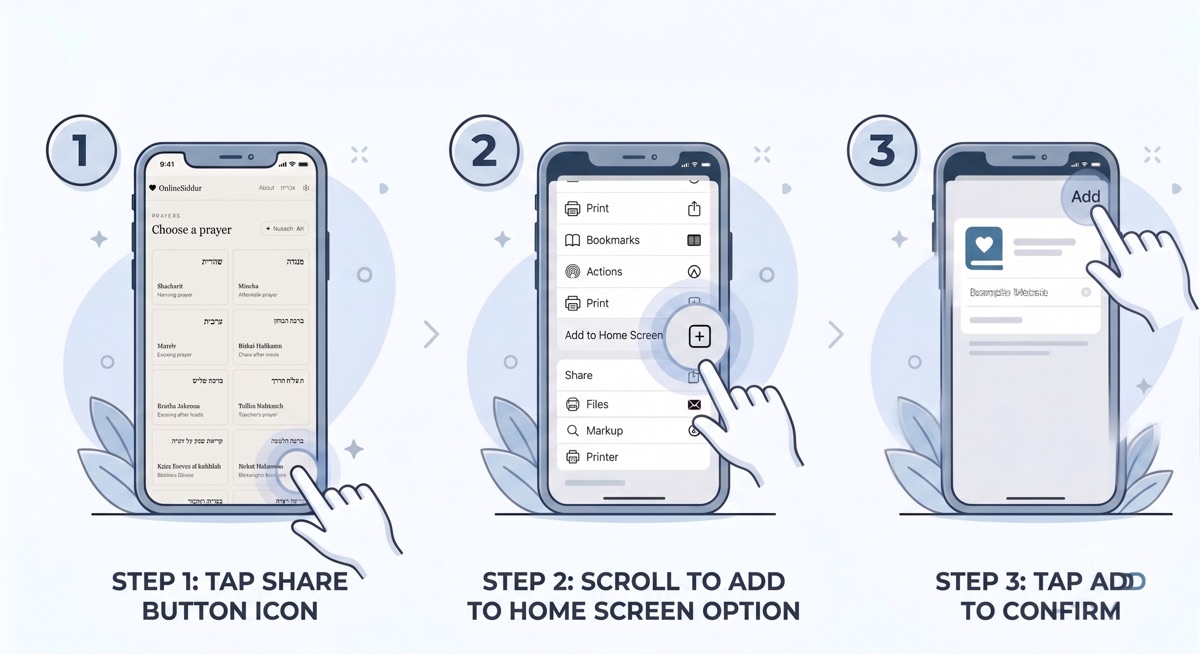
- Tap the Share button in your browser’s toolbar.הקישו על כפתור השיתוף בסרגל הדפדפן.
- Scroll down the list and choose “Add to Home Screen”.גללו ברשימה ובחרו ״הוספה למסך הבית״.
- Tap “Add” to confirm.הקישו על ״הוסף״ לאישור.
Adding OnlineSiddur to your home screen gives it its own icon and opens it full screen, with no address bar — like an app. Open it once from the new icon while you have a connection: it saves the whole siddur to your phone, and after that it works with no network. To check, open Settings (the gear icon) and look under Offline. הוספת OnlineSiddur למסך הבית נותנת לו סמל משלו ופותחת אותו במסך מלא, בלי שורת כתובת — כמו אפליקציה. פתחו אותו פעם אחת מהסמל החדש כשיש חיבור לרשת: הוא שומר את כל הסידור בטלפון, ומאז הוא פועל גם בלי רשת. כדי לבדוק, פתחו את ההגדרות (סמל גלגל השיניים) וראו תחת „בלי רשת”.
OnlineSiddur is already installed — you are reading it now. OnlineSiddur כבר מותקן — אתם קוראים בו כעת.